NodeList vs HTMLCollection in JavaScript: The Differences Every Developer Should Know
1. Introduction: The DOM Collection Bug You Might Not Expect
Imagine we have three HTML elements and want to remove a class from all of them using a simple JavaScript loop. Our code looks perfectly reasonable:
<p class="item">First</p>
<p class="item">Second</p>
<p class="item">Third</p>
const items = document.getElementsByClassName("item");

for (let i = 0; i < items.length; i++) {
    items[i].classList.remove("item");
}

console.log(items.length);
we might expect the loop to process all three elements and print 0. Instead, the output is:
1
Why was one element left behind?
The problem lies in how getElementsByClassName() returns a live HTMLCollection. Whenever an element loses the item class, it is removed from the collection, changing its length and shifting the indices of the remaining elements.
This is one example of how two similar-looking DOM collections can behave differently.
JavaScript commonly provides two collection types: NodeList and HTMLCollection. Although both allow you to access multiple nodes or elements, they differ in their contents, available methods, and behavior when the DOM changes.
Understanding these differences helps you write predictable DOM manipulation code and avoid subtle bugs. Let's explore how these collections work, how they differ, and when to use each one.
2. Understanding DOM Collections
Before comparing NodeList and HTMLCollection, let's understand how JavaScript represents HTML elements.
The Document Object Model (DOM) represents an HTML document as a tree of objects, allowing JavaScript to access, modify, add, and remove elements.
Consider this HTML:
<div>
  Hello
  <p>Welcome to JavaScript</p>
</div>
The browser represents this structure using different types of nodes:
Element nodes: The
andelements.
Text nodes: The text Hello and Welcome to JavaScript, along with whitespace between elements.
Comment nodes: HTML comments, when present in the document.
This brings us to an important distinction: every element is a node, but not every node is an element.
What Are DOM Collections?
DOM APIs(A DOM API is a browser-provided method or property for working with the document. When it finds multiple nodes or elements, it may provide them as a collection such as a NodeList or HTMLCollection) often return collections when multiple nodes or elements match a selection. For example, selecting all elements with a particular class may return several results.
const items = document.querySelectorAll("p");

console.log(items.length); // Number of matching elements
console.log(items[0]);     // First matching element
Here, items is a NodeList containing the matching paragraph elements.
Both NodeList and HTMLCollection are array-like objects because they provide a length property and indexed access. However, they are not actual JavaScript arrays, so they do not directly support every array method, such as map() and filter().
Understanding this distinction is the first step toward understanding how these two DOM collections differ.
3. What Is a NodeList?
A NodeList is a collection of DOM nodes returned by certain browser DOM APIs. Depending on the API, it may contain elements, text nodes, or comment nodes. Common sources of NodeList
1. document.querySelectorAll() — static NodeList
Here static word is used, do not worry we will see it further when we will discuss about the differences between NodeList and HTMLCollection.
Returns all elements matching a CSS selector. The collection does not automatically update when the DOM changes.
<p class="item">First</p>
<p class="item">Second</p>
<p class="item">Third</p>
const items = document.querySelectorAll(".item");
console.log(items.length);

items.forEach(item => {
    console.log(item.textContent);
});
OUTPUT:
3
First
Second
Third
2. element.querySelectorAll() — static NodeList
It works like document.querySelectorAll(), but searches for matching elements only inside a specific element.
<div id="container">
    <p>First paragraph</p>
    <p>Second paragraph</p>
</div>

<p>Outside paragraph</p>
const container = document.querySelector("#container");
const paragraphs = container.querySelectorAll("p");

console.log(paragraphs.length); // 2
Only the two paragraphs inside #container are selected.
3. element.childNodes — Live NodeList
The childNodes property returns all child nodes, including text nodes and comments. Its collection updates automatically when child nodes are added or removed.
<div id="container"><p>Hello</p><p>Welcome</p></div>
const container = document.querySelector("#container");
const nodes = container.childNodes;

console.log(nodes.length); // 2

container.appendChild(document.createElement("p"));

console.log(nodes.length); // 3
The nodes collection reflects the newly added paragraph because it is live. Note that whitespace and comments in HTML can also count as child nodes.
4. document.getElementsByName() — Live NodeList
This method returns elements whose name attribute matches the specified value.
<input name="username">
<input name="username">
<input name="email">
const fields = document.getElementsByName("username");

console.log(fields.length); // 2
Important NodeList properties and methods
length — returns the number of nodes.
Indexed access (list[0]) — accesses a node by index.
item(index) — returns the node at the specified index, or null if it is out of range.
forEach() — executes a callback for each node.
entries() — returns an iterator of index-node pairs.
keys() — returns an iterator of indices.
values() — returns an iterator of nodes.
for...of — iterates over nodes directly.
Remember that a NodeList is array-like, but it is not an actual JavaScript array. Methods such as map() and filter() are unavailable directly. Use Array.from(nodes) or [...nodes] when we need array methods.
NOTE: Not every NodeList is static. Its behavior depends on the DOM API that creates or exposes it.
We will see the Static and Live behaviour further in this article.
4. What Is an HTMLCollection?
An HTMLCollection is a collection of HTML or other DOM elements. Unlike a NodeList, it contains only element nodes, not text nodes or comments(we will se further in detail). It is generally live, meaning it automatically reflects changes to the DOM. Common methods that return an HTMLCollection:
1. getElementsByClassName()
<p class="item">First</p>
<p class="item">Second</p>
<p>Third</p>
const items = document.getElementsByClassName("item");

console.log(items.length); // 2
console.log(items[0].textContent); // "First"
console.log(items.item(1).textContent); // "Second"
2. getElementsByTagName()
Returns elements matching the specified tag name. Use "*" to select all descendant elements.
<div id="container">
    <p>First</p>
    <p>Second</p>
</div>
const paragraphs = document.getElementsByTagName("p");

console.log(paragraphs.length); // 2

const allElements = document.getElementsByTagName("*");
console.log(allElements.length); // Number of elements in the document
This method is also available on an element, where it searches only that element's descendants.
3. element.children
Returns the direct child elements of an element, excluding text nodes and comments.
<div id="container">
    <p>First</p>
    <span>Second</span>
</div>
const container = document.querySelector("#container");

console.log(container.children.length); // 2
console.log(container.children[0].tagName); // "P"
4. document.forms
Returns all forms in the document.
<form id="loginForm"></form>
<form id="signupForm"></form>
console.log(document.forms.length); // 2
console.log(document.forms[0].id); // "loginForm"
5. document.images
Returns all image elements.
<img src="one.jpg" alt="First">
<img src="two.jpg" alt="Second">
console.log(document.images.length); // 2
Other document properties that return an HTMLCollection include document.scripts, document.links, document.embeds, document.plugins.
Important properties and methods
length — returns the number of elements.
Indexed access (items[0]) — accesses an element by index.
item(index) — returns the element at the specified index, or null if the index is out of range.
namedItem(name) — finds an element by its id or, in certain cases, its name.
An HTMLCollection is not a JavaScript array, so methods such as forEach(), map(), and filter() are not directly available. Convert it using Array.from(items) when you need array methods.
NOTE: HTMLCollection contains elements only and is generally live. Be careful when removing or adding elements while iterating over it.
5. Live vs. Static Collections: The Most Important Difference
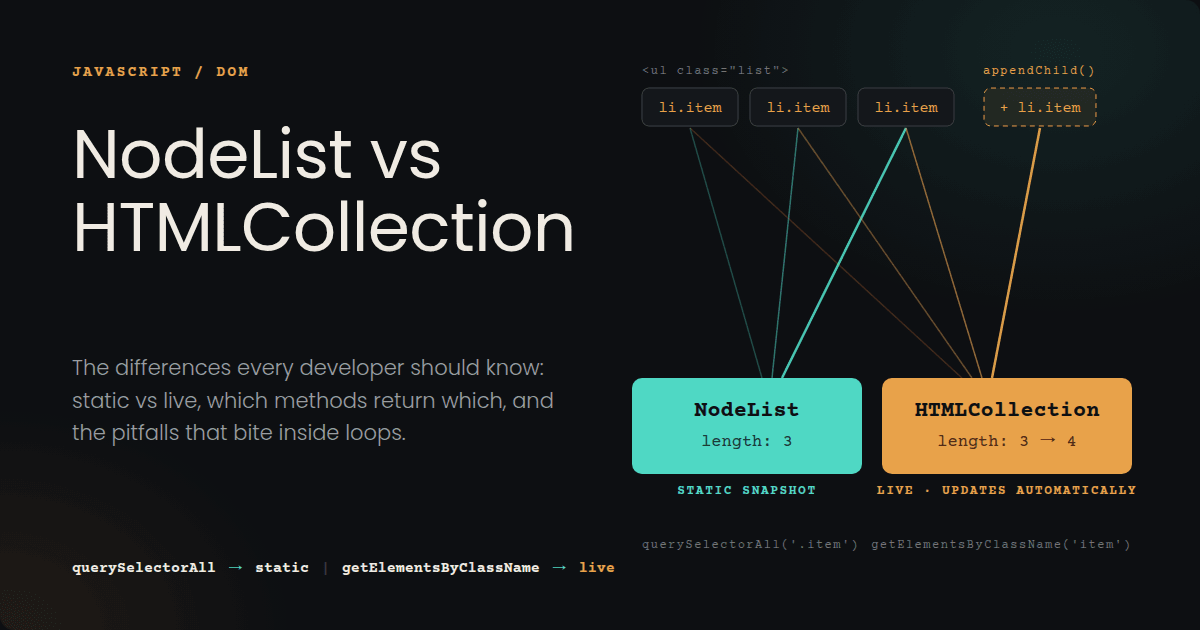
The most important difference between *live8 and static collections is how they respond to changes in the DOM.
Live collection: Automatically updates its membership when relevant DOM changes occur.
Static collection: Keeps the same elements it had when it was created, even if the DOM changes later.
Example 1: Adding and Removing Elements
<div id="container">
    <p class="item">First</p>
    <p class="item">Second</p>
</div>
const container = document.querySelector("#container");

const staticList = container.querySelectorAll(".item");
const liveCollection = container.getElementsByClassName("item");

console.log(staticList.length);     // 2
console.log(liveCollection.length); // 2

// Add a matching element
const newItem = document.createElement("p");
newItem.className = "item";
newItem.textContent = "Third";
container.appendChild(newItem);

console.log(staticList.length);     // 2 — unchanged
console.log(liveCollection.length); // 3 — updated

// Remove an element
container.querySelector("p").remove();

console.log(staticList.length);     // 2 — unchanged
console.log(liveCollection.length); // 2 — updated
Why does this happen? querySelectorAll() returns a static NodeList, whereas getElementsByClassName() returns a live HTMLCollection. The static list retains its original membership, while the live collection reflects the addition and removal.
Example 2: Changing an Element's Class
Live collections can also change when an element starts or stops matching the collection's criteria.
<p class="item">First</p>
<p>Second</p>
const staticList = document.querySelectorAll(".item");
const liveList = document.getElementsByClassName("item");

document.querySelectorAll("p")[1].classList.add("item");

console.log(staticList.length); // 1
console.log(liveList.length);   // 2
The second paragraph now has the item class. The live collection includes it, but the existing static list does not.
Important Exception: childNodes Returns a Live NodeList
Not every NodeList is static. The childNodes property returns a live NodeList, which updates when child nodes are added or removed.
<div id="box"><p>First</p><p>Second</p></div>
const box = document.querySelector("#box");
const nodes = box.childNodes;

console.log(nodes.length); // 2

box.appendChild(document.createElement("p"));

console.log(nodes.length); // 3 — updated
Because there is no whitespace between the tags, the original collection contains exactly two child nodes: the two paragraphs. In normally formatted HTML, whitespace and comments can also count as child nodes.
A Static NodeList Does Not Freeze the DOM
Static describes the collection's membership, not the immutability of its elements. The collection retains its original element references, but those elements can still be modified or removed from the document.
const items = document.querySelectorAll(".item");

items[0].textContent = "Updated text";
items[0].classList.add("active");

console.log(items[0].textContent); // "Updated text"
console.log(items.length);         // Original count
The text and class change because the referenced DOM element remains mutable. The static collection simply does not automatically update its membership.
NOTE: querySelectorAll() returns a static NodeList, childNodes returns a live NodeList, and getElementsByClassName() returns a live HTMLCollection. Always check the API that produced the collection rather than assuming its behavior from its type alone.
6. NodeList vs HTMLCollection: Key Differences
Both NodeList and HTMLCollection are used to access groups of DOM nodes or elements. However, they differ in what they contain, the methods they support, and how they respond to DOM changes.
| Feature | NodeList | HTMLCollection |
|---|---|---|
| Contents | Can contain different node types | Contains elements only |
length |
Yes | Yes |
Indexed access ([0]) |
Yes | Yes |
item() |
Yes | Yes |
forEach() |
Yes | No |
namedItem() |
No | Yes |
map() / filter() directly |
No | No |
| Live or static | Depends on the API | Generally live |
| Common example | querySelectorAll() |
getElementsByClassName() |
Remember these two points:
Both collections support indexed access and are iterable in modern browsers, but neither is a JavaScript array.
Not every NodeList is static. For example, childNodes returns a live NodeList, whereas querySelectorAll() returns a static one.
The main difference is not simply live versus static; it is also what each collection contains and which methods it provides.
One more thing, we saw the sentence "Unlike a NodeList, it contains only element nodes, not text nodes or comment nodes" while we were discussing about the HTML Collection, let's understand it.
HTMLCollectioncontains only HTML elements, such as<div>,<p>, and<span>.NodeList can contain different types of nodes, including elements, text, and comments.
<div id="container">
    Hello
    <p>Welcome</p>
    <!-- This is a comment -->
</div>
const container = document.querySelector("#container");

const elements = container.children;
const nodes = container.childNodes;

console.log(elements.length); // 1
console.log(nodes.length);    // 5
Why?
- children returns an HTMLCollection containing only the
element.
- childNodes returns a live NodeList containing the text nodes (including whitespace), the
element, and the comment.
Remember : HTMLCollection contains only elements, while NodeList can contain elements and other types of nodes.
7. Common Bugs and How to Avoid Them
Live collections can cause unexpected bugs when we add, remove, or change elements while looping through them. Here are the most common mistakes and how to avoid them.
1. Removing elements while looping through a live collection
<p class="item">First</p>
<p class="item">Second</p>
<p class="item">Third</p>
const items = document.getElementsByClassName("item");

for (let i = 0; i < items.length; i++) {
    items[i].classList.remove("item");
}

console.log(items.length); // 1 — one element remains
Why does this happen? Removing the class changes the live collection. The remaining elements shift their positions, so the loop skips some elements.
Fix: Create a static snapshot before looping.
const items = document.getElementsByClassName("item");

for (const item of Array.from(items)) {
    item.classList.remove("item");
}

console.log(items.length); // 0
Array.from(items) creates an array of the elements selected at that moment, so changes to the live collection do not affect the loop's list.
2. Assuming a static NodeList updates automatically
const items = document.querySelectorAll(".item");

const newItem = document.createElement("p");
newItem.className = "item";
document.body.appendChild(newItem);

console.log(items.length); // Original count — unchanged
Why? querySelectorAll() returns a static NodeList. It does not automatically include elements added after the selection.
Fix: Run querySelectorAll() again to get an updated list of matching elements.
3. Confusing element changes with collection changes
const items = document.querySelectorAll(".item");

items[0].textContent = "Updated";

console.log(items[0].textContent); // "Updated"
console.log(items.length);         // Original count
A static NodeList still references the original elements. Their text, classes, and attributes can change even though the collection's membership stays the same.
4. Assuming every collection supports array methods
const items = document.querySelectorAll(".item");

items.forEach(item => console.log(item.textContent)); // Works

// items.map(...) — TypeError
A NodeList supports forEach(), but it does not directly support methods such as map() and filter(). An HTMLCollection does not have forEach().
Fix: Convert the collection to an array when you need array methods.
const items = document.getElementsByClassName("item");

const texts = Array.from(items, item => item.textContent);

console.log(texts); // Array of item texts
NOTE: Check whether a collection is live or static before modifying elements inside a loop. Use Array.from() when you need a stable list or array methods.
8. Iteration and Array Conversion
Both NodeList and HTMLCollection let you loop through elements. However, some looping methods work only with NodeList, and neither collection directly supports all array methods.
1. Using a for loop or for...of
<p class="item">First</p>
<p class="item">Second</p>
const items = document.querySelectorAll(".item");

for (let i = 0; i < items.length; i++) {
    console.log(items[i].textContent);
}
// First
// Second

for (const item of items) {
    console.log(item.textContent);
}
// First
// Second
2. Using forEach()
const items = document.querySelectorAll(".item");

items.forEach(item => {
    console.log(item.textContent);
});
// First
// Second
3. Using map(), filter(), and reduce()
These methods belong to arrays, so we cannot directly use them on a NodeList or HTMLCollection.
Convert the collection to an array first.
const items = document.querySelectorAll(".item");

const itemTexts = Array.from(items, item => item.textContent);

console.log(itemTexts);
// ["First", "Second"]
we can also use spread syntax:
const itemsArray = [...document.querySelectorAll(".item")];

const activeItems = itemsArray.filter(item =>
    item.classList.contains("active")
);

console.log(activeItems.length); // Number of active items
4. Does converting a collection copy the elements?
No. Array.from() and spread syntax create a new array containing references to the existing DOM elements. They do not create copies of those elements.
const items = document.querySelectorAll(".item");
const itemsArray = [...items];

itemsArray[0].textContent = "Updated";

console.log(items[0].textContent); // "Updated"
The text changes because both collections reference the same DOM element.
Use for...of for simple loops, forEach() with a NodeList, and Array.from() or spread syntax when you need array methods like map() and filter().
9. Performance and Best Practices
The best collection depends on what you want to do. Neither NodeList nor HTMLCollection is always faster.
1. Choose the API methods based on your needs
Use querySelectorAll() when you want to select elements using a CSS selector and keep the result unchanged when new matching elements are added.
const items = document.querySelectorAll(".item");

console.log(items.length); // Number of matches at selection time
Use getElementsByClassName() when you want a collection that updates automatically as elements gain or lose that class.
const items = document.getElementsByClassName("item");

console.log(items.length); // Current number of matching elements
2. Convert live collections before modifying elements in a loop
If we need to remove classes or elements while looping through a live collection, its length and indexes can change. This may cause us to skip elements.
const items = document.getElementsByClassName("item");

for (const item of Array.from(items)) {
    item.classList.remove("item");
}
Array.from() creates an array of references to the selected elements, so changes to the live collection do not change the array's membership.
3. Avoid unnecessary repeated queries
If you need the same collection several times, store it in a variable instead of repeatedly selecting the elements.
const items = document.querySelectorAll(".item");

items.forEach(item => {
    console.log(item.textContent);
});
4. Do not choose based on speed alone
Performance depends on the operation, the number of elements, and the browser. The collection should be chosen based on the required behavior, with performance testing used when needed.
Best practice: Use querySelectorAll() for a static selection, live collections when automatic updates are useful, and arrays when array methods or safer iteration during DOM changes are needed.
10. Which One Should we Use?
- Use querySelectorAll(): when there is need to select elements using CSS selectors and keep the original list of matches.
const items = document.querySelectorAll(".item");
- Use a live collection when there is need to update collection automatically as elements are added, removed, or change classes.
const items = document.getElementsByClassName("item");
- Need array methods? Convert the collection into an array using Array.from().
const itemsArray = Array.from(items);
itemsArray.map(item => item.textContent);
- Modifying elements in a loop? Live collections may change when classes or elements are modified during iteration.
Simple rule: we will choose the collection based on behaviour we want, not just its name.
11. Conclusion
- NodeList and HTMLCollection provide access to nodes or elements in the DOM.
- A NodeList can be live or static, depending on the API that returns it.
- An HTMLCollection contains only elements and is generally live.
- Neither is a regular JavaScript array, but both can be converted into arrays.
- Understanding these differences helps prevent bugs when modifying the DOM.
Further Reading
For more details, refer to the official MDN Web Docs:
- NodeList — Learn about NodeList, its methods, and the difference between live and static lists.
- HTMLCollection — Explore how HTMLCollection works and how it differs from NodeList.
- Document.querySelectorAll() — Understand how to select elements using CSS selectors and why the returned NodeList is static.
- Selection and traversal on the DOM tree — Learn more about selecting and navigating DOM elements and nodes.
Comments
Join the discussionNo comments yet. Be the first to comment.


